Developing bots with Tock
Tock Studio allows you to build conversational journeys (or stories) including text, buttons, images, carousels, etc. To go further, it is possible to program journeys in Kotlin, Javascript, Python or other languages.
Choosing a development mode
Two modes are available:
| Bot API (recommended) | Integrated bot | |
|---|---|---|
| Languages | Kotlin, Javascript/Node.js, Python, or any language through the API | Kotlin only |
| Connection to the platform | Through the bot_api service (WebSocket or WebHook) |
Direct access to the MongoDB database of the platform |
| Demo platform | Available | Not available |
| Features | Most of the Tock features | All the Tock features, including the coroutine stories |
| Setup | Simple: the bot only needs an API key | A Tock platform (usually with Docker) and a shared MongoDB access |
Choose the Bot API mode unless you need a feature that only the integrated mode provides.
The Bot API mode
The bot is an application that connects to the bot_api service of the platform, and receives the user messages
to answer them:
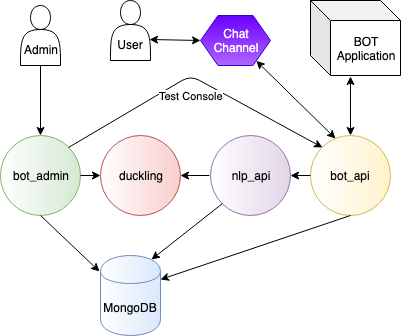
See the Bot API page.
The Integrated bot mode
The historical development mode of Tock: the bot embeds the Tock framework and accesses the MongoDB database directly. Most of the bots built by the Tock designers are developed in this way.
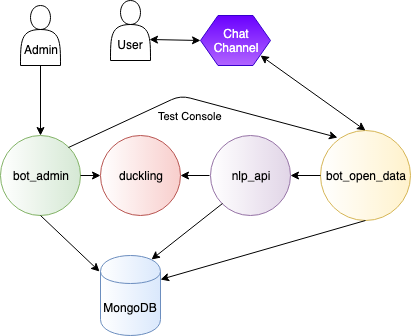
See the Integrated bot page.
Going further
- Internationalization of the answers
- Testing the stories
- Creating a connector
- APIs of the platform and of the Gen AI orchestrator
- Code examples
 Chat with Tock