The Model Quality menu
The Model Quality (or NLU QA) menu allows you to evaluate and monitor over time the quality/relevance/performance of conversational models.
The Model Stats tab
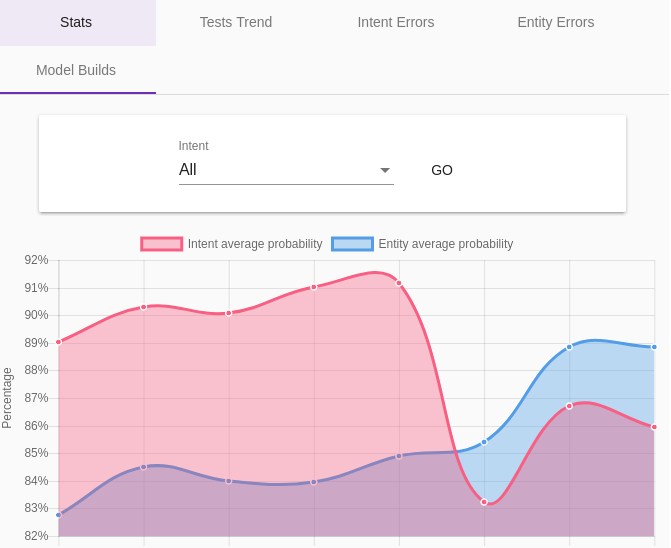
This screen presents graphs to track the evolution of several indicators of the quality of the conversational model:
-
Relevance: the scores of the detection algorithms on intents (Intent average probability) and on entities (Entity average probability)
-
Traffic / errors: the number of requests to the model (Calls) and the number of errors (Errors)
-
Performance: the response time of the model (Average call duration)
The Intent Distance tab
The metrics presented in the table on this page (Occurrences and Average Diff) allow you to identify intents that are more or less close in the model, in particular to optimize the modeling.
The Count Stats tab
This tab lists the sentences most often received by the bot, with the number of occurrences of each one, its last usage, the intent detected (with its probability and the probability of the entities) and whether the sentence has been validated. Filter by intent (or Unknown) and set a minimum count to find the frequent sentences that are not yet qualified, or that are misunderstood.
The Model Builds tab
This screen presents statistics on the latest reconstructions of the model. These are therefore indications on the performance of the model.
The Test Trends tab
The Partial model tests are a classic way to detect qualification errors, or problems of proximity of intents (or entities) between them.
This involves taking a part of the current model at random (for example 90% of the sentences of the model) in order to build a slightly less relevant model, then testing the remaining 10% with this new model.
The principle established, all that remains is to repeat the process a certain number of times so that the most frequent errors are presented to a manual corrector.
Note that these tests are only useful with already substantial models.
This tab shows the evolution of the relevance of the partial model tests.
By default, the tests are scheduled to be launched from midnight to 5am, every 10 minutes. It is possible to configure this behavior with the
tock_test_model_timeframeproperty: the start and end hours, separated by a comma (default:0,5).
The Test Intent Errors tab
This screen shows the results of the partial tests of intent detection (see above), with the details of the phrases/expressions recognized differently from the real model.
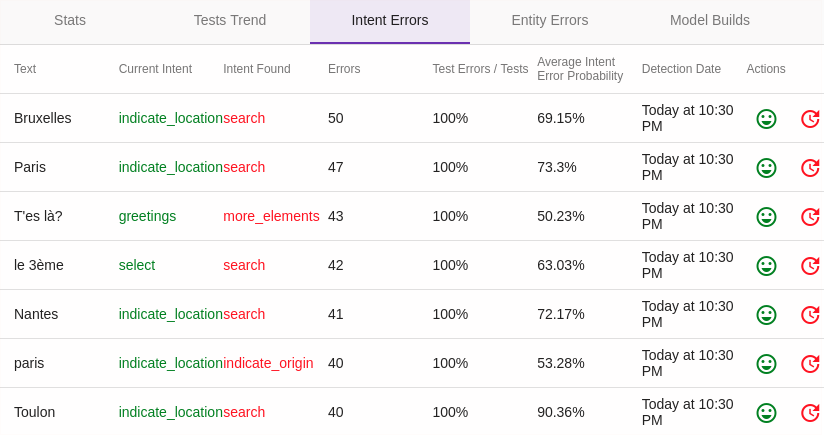
In this example, no "real" error was detected. However, we can see that in some cases the model is systematically wrong, with a high probability.
For each sentence, it is possible via the Actions column to confirm that the basic model is correct (with Validate Intent) or to correct the detected error (Change The Intent).
It is interesting to periodically analyze these differences, some differences being well explained, even being sometimes "assumed" (false negatives), others can reveal a problem in the model.
The Test Entity Errors tab
Like Intent Test Errors for entities, this screen presents the results of partial tests for entity detection.
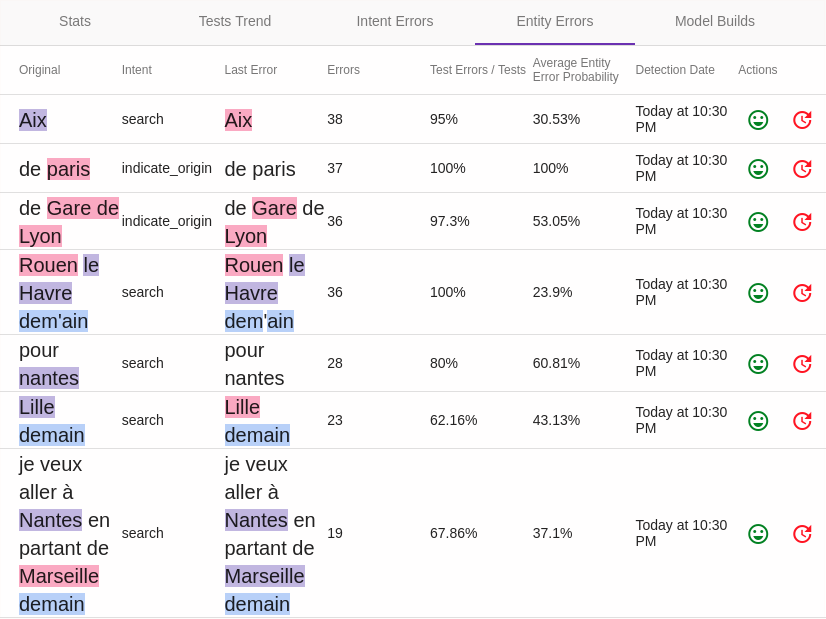
It is interesting to periodically analyze these differences, some differences being well explained, even being sometimes "assumed" (false negatives), others can reveal a problem in the model.
 Chat with Tock