Deploy on Kubernetes
The tock-helm-chart repository provides a
Helm chart that deploys a complete Tock platform on Kubernetes.
This page summarizes how to use the chart. The reference for all the chart parameters is its README.
What is deployed
The chart deploys all the Tock components:
| Component | Image | Kubernetes resources |
|---|---|---|
| Tock Studio | tock/bot_admin |
Deployment, Service, Ingress |
| Bot API | tock/bot_api |
Deployment, Service, Ingress |
| NLP API | tock/nlp_api |
Deployment, Service |
| Build worker | tock/build_worker |
Deployment |
| Duckling | tock/duckling |
Deployment, Service |
| Kotlin compiler | tock/kotlin_compiler |
Deployment, Service |
| Gen AI orchestrator | tock/gen-ai-orchestrator-server |
Deployment, Service |
It can also deploy the databases as sub-charts, or connect to existing ones:
- MongoDB (Bitnami chart), deployed by default as a 3-node replica set
- OpenSearch (and optionally OpenSearch Dashboards), as the vector store for the RAG
- PostgreSQL with PGVector, as an alternative vector store
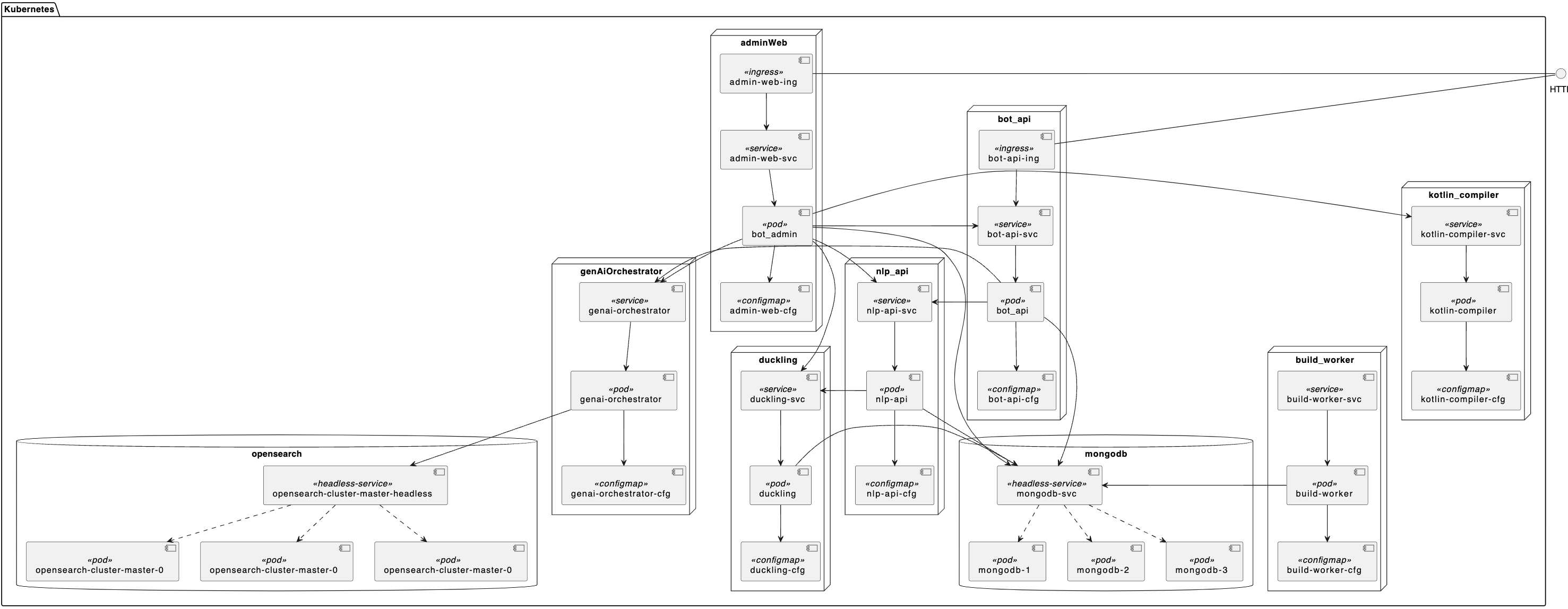
See the architecture page for the role of each component.
Installation
The chart is published both as an OCI artifact and in a classic Helm repository:
- OCI artifact:
oci://ghcr.io/theopenconversationkit/charts/tock - Helm repository:
https://theopenconversationkit.github.io/tock-helm-chart/, charttock
helm install mytock oci://ghcr.io/theopenconversationkit/charts/tock --version <chart-version> -f values.yaml
helm repo add tock https://theopenconversationkit.github.io/tock-helm-chart/
helm repo update
helm search repo tock
helm install mytock tock/tock --version <chart-version> -f values.yaml
Each chart version deploys a given Tock version by default (
appVersioninhelm search repo tock). To deploy another Tock version, set theimage.tagof each component in your values file.The latest chart version (0.6.3) deploys Tock 25.10.7 by default, older than the version described in this documentation (26.9.1): set
image.tagto26.9.1to use the features described here.
Once the release is installed, Helm displays the URLs of Tock Studio and of the Bot API.
The default login/password of Tock Studio is admin@app.com / password: change it before opening
the platform (see Authentication).
Main parameters
The parameters are grouped by component (adminWeb, botApi, nlpApi, buildWorker, duckling,
kotlinCompiler, genAiOrchestrator) and in a global section. For each component, you can set the image,
the number of replicas, the resources, the security contexts, the scheduling constraints and the environment
variables (environment section, see the configuration reference).
Ingress
The adminWeb and botApi components are exposed through an Ingress, on the following hosts:
tockstudio-<release>.<global.wildcardDomain>for Tock Studiobot-api-<release>.<global.wildcardDomain>for the Bot API
global:
  wildcardDomain: tock.mydomain.com
  ingressClassName: nginx

adminWeb:
  ingress:
    enabled: true
    tls:
      - secretName: tock-tls
        hosts:
          - tockstudio-mytock.tock.mydomain.com

botApi:
  ingress:
    enabled: true
Only the Bot API must be reachable by the external channels (see Network exposure).
MongoDB
By default, the chart deploys MongoDB as a replica set (global.deployMongoDb.enabled: true), configured
with the mongodb section (see the Bitnami chart).
Persistence is enabled with a 1 GiB volume: increase mongodb.persistence.size for a real use.
To use an existing database, disable the sub-chart and give the connection string:
global:
  deployMongoDb:
    enabled: false
  mongodbUrls: mongodb://myuser:mypass@fqdn-node1:27017,fqdn-node2:27017,fqdn-node3:27017/mydb?replicaSet=rs0
  mongodbcheckfqdn: fqdn-node1
  mongodbPort: "27017"
The database must be a replica set (see MongoDB database).
Vector store
The vector store used by the Gen AI orchestrator is selected from the global section:
global:
  deployOpenSearch:
    enabled: true            # deploy the OpenSearch sub-chart
    dashboardEnabled: false  # optionally deploy OpenSearch Dashboards
global:
  deployPgVector:
    enabled: true            # deploy the PostgreSQL sub-chart with PGVector

postgresql:
  auth:
    postgresPassword: <password>
global:
  deployOpenSearch:          # or deployPgVector with pgVectorHost, pgVectorPort...
    useExisting: true
    openSearchHost: opensearch.mydomain.com
    openSearchPort: "9200"
    openSearchUser: <user>
    openSearchPwd: <password>
The connection parameters of the orchestrator are then set by the chart. The LLM and embedding providers are configured in Tock Studio (see LLM and embedding providers).
Authentication
The Tock Studio users can be defined in a ConfigMap, referenced by adminWeb.authConfigMap:
apiVersion: v1
kind: ConfigMap
metadata:
  name: admin-web-auth-cfg
data:
  tock_users: "alice@tock.ai,bob@tock.ai"
  tock_passwords: "secret1,secret2"
  tock_organizations: "tock,tock"
  tock_roles: "botUser,nlpUser|botUser|admin|technicalAdmin"
adminWeb:
  authConfigMap: admin-web-auth-cfg
In this example, Alice has the botUser role, and Bob has all the roles. See Security
for the roles, and for the OAuth2 / OpenID Connect authentication.
Enterprise certificates
If your bot or the orchestrator calls services signed by an internal certificate authority, the chart can build a truststore from a Secret:
kubectl create secret generic corp-root-cert --from-file=corp-root-cert.crt
botApi:
  truststore:
    enabled: true
    certSecret: corp-root-cert

genAiOrchestrator:
  truststore:
    enabled: true
    certSecret: corp-root-cert
Deployment without Internet access
With OpenAI models, the orchestrator uses tiktoken, which downloads its encodings at startup. Without Internet
access, provide them in an init container image, enabled with genAiOrchestrator.langchain.tiktokencache.
The chart README
describes how to build this image.
Production recommendations
- Keep a single replica for
adminWeb,buildWorkerandkotlinCompiler, and use several replicas forbotApi,nlpApi,ducklingandgenAiOrchestrator(see Cloud). - Set
resourcesfor each component, with a memory limit above the maximum JVM heap (see JVM & Docker memory). - Enable
global.NetworkPolicy.enabledto restrict the traffic between the pods. - Review the MongoDB configuration (authentication, persistence, backups), or use a managed database.
- Change the default passwords (Tock Studio, OpenSearch, PostgreSQL).
Examples
The samples folder of the
repository contains values files for several environments: Rancher Desktop or k3s
(Intel and ARM), GKE with the native or NGINX ingress, an external MongoDB, local authentication, RAG with
OpenSearch or PGVector, and a local LLM with Ollama.
For example, to test Tock with a RAG on Rancher Desktop:
git clone https://github.com/theopenconversationkit/tock-helm-chart.git && cd tock-helm-chart
helm install mytock ./charts/tock -f samples/values-rancher-arm-with-rag-and-pgvector.yaml
Tock Studio is then available at http://tockstudio-mytock.rancher.localhost.
On ARM processors, or on processors without AVX instructions, the default MongoDB image does not start: the samples use a compatible image (
mongodb.image).
 Chat with Tock