The Playground menu
The Playground lets you send prompts directly to an LLM, with the provider and settings of your choice, to try out a model or a prompt before changing the bot configuration.
Unlike the RAG, the playground does not search the vector store: the prompt is sent as is to the model.
To access this page, you need the admin role (more details on roles in security).
LLM settings
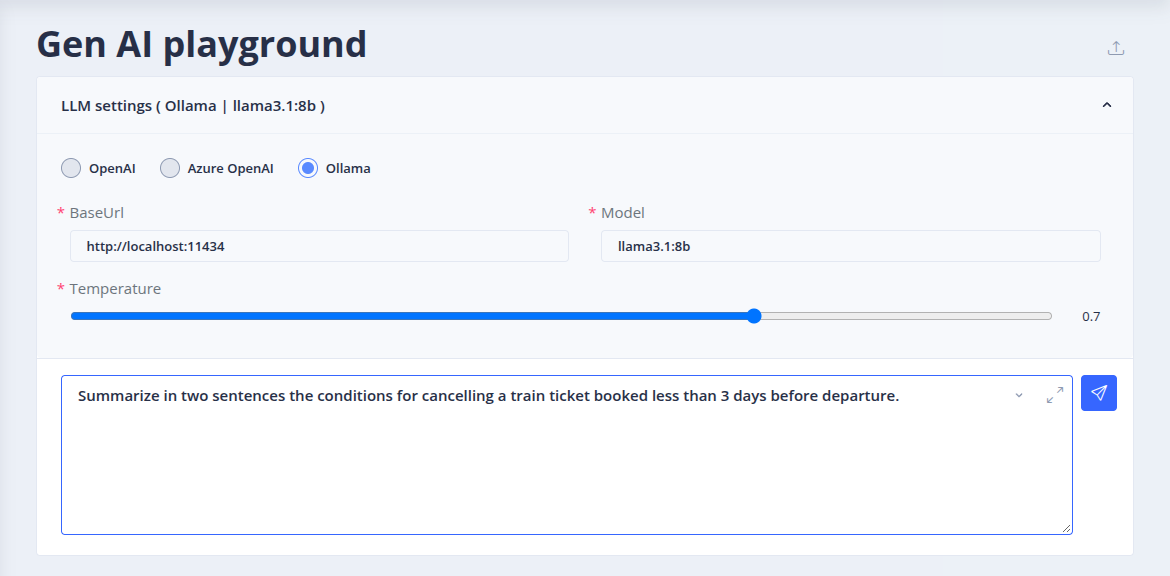
The LLM settings panel is initialized with the LLM settings of the bot RAG configuration. You can change the provider and its parameters (model, temperature, etc.): see the list of LLM providers.
The Import Rag settings dump button loads the LLM settings from a RAG settings export, for instance to try the configuration of another bot or environment.
Prompt
Type the prompt in the input area, or use the prompt menu to:
- Load current bot prompt: the answering prompt of the bot RAG configuration,
- Load default prompt: the default RAG prompt,
- Clear prompt.
Then send the query. The answer is displayed with its response time. The query history can be browsed back and forth, and cleared.
Observability
If an observability provider is configured for the bot, each answer offers a link to its trace (for example in Langfuse), to see the exact request sent to the model, the token usage and the latency.
 Chat with Tock